

Protect Your WordPress Login Like a Bank
Do you know how many times someone tries to log in to your WordPress website every day?
You may not even notice it.
Automated bots scan WordPress websites around the clock, trying common usernames, passwords, and standard login URLs.
100, 300, 500 — sometimes even more failed login attempts every single day?
Today, that is not unusual.
The problem is not always a weak password
You can have a very strong password.
You can keep WordPress fully updated.
You can block IP addresses.
And bots may still keep trying to log in hundreds of times every day.
Why?
Because the standard WordPress login form is easy for automated bots to find.
The bot knows where the door is.
And it can keep trying to open it again and again.
What if WordPress login worked more like online banking?
When you access your bank account, authentication is not always limited to simply entering a username and password.
There is often an additional verification step.
A360 Login Avatar Panel adds an additional step to the standard WordPress login process — similar to the way banks add another layer of user verification.
Instead of giving automated bots immediate access to the standard username and password form, WordPress can require an additional step first.
For a real user, it is simple.
For an automated bot, it creates a completely different obstacle.
Stop fighting bots one IP address at a time
You do not have to keep blocking new IP addresses.
You do not have to analyze every login attempt.
You do not have to constantly check your security logs.
Instead, you can change the way users reach the WordPress login process.
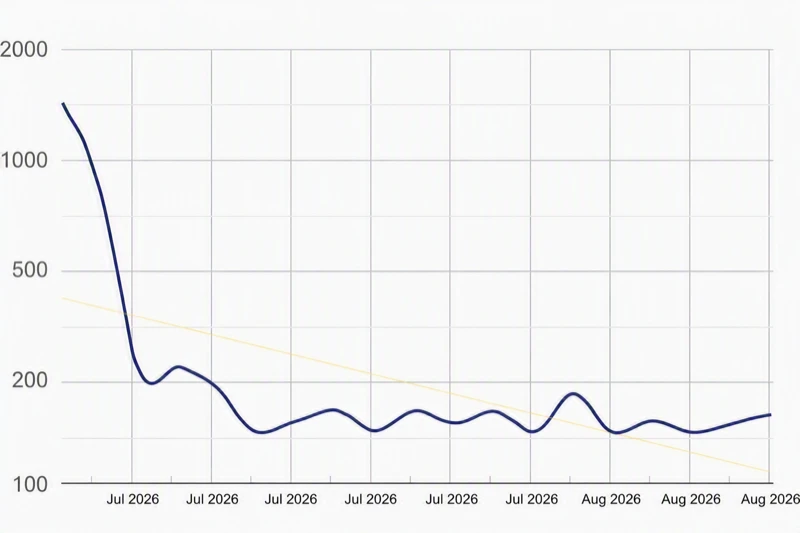
Before
427 login attempts per day
Bot → standard WordPress login → username → password → another attempt → another attempt → another attempt…
After adding an extra login step
427 → 63 → 8 → 0
Bot → additional verification step → no direct access to the standard login form
In practice, automated login attempts can drop dramatically and, after some time, may even fall close to zero.
Bank-style login protection in about one minute
You do not need to rebuild your website.
You do not need to change your hosting provider.
You do not need a complicated security system.
If you use WordPress:
- Install the plugin.
- Enable the additional login step.
- Configure access.
- Done.
What do you get?
✓ An additional step in the standard WordPress login process
✓ Fewer automated login attempts
✓ Less unnecessary traffic generated by bots
✓ More control over access to your WordPress admin area
✓ A simple process for legitimate users
✓ No need to rebuild your website
✓ A free version
Your website is your business
If you run a WooCommerce store, company website, portal, blog, or manage websites for your clients, your WordPress admin panel provides access to things that have real value:
- orders,
- customer data,
- website content,
- contact forms,
- settings,
- SEO,
- integrations,
- and the entire administration of your website.
Do you really want to protect all of that with nothing more than a standard username and password screen?
Check how many login attempts your website receives today
Take a look at your security logs.
If you see dozens or hundreds of failed login attempts every day, install A360 Login Avatar Panel and compare the numbers after a few days.
The difference may surprise you.
A360 Login Avatar Panel
An additional WordPress login step — like in online banking.
Simple.
Fast.
No website rebuild required.
And free.
👉 https://wordpress.org/plugins/a360-login-avatar-panel/
Do not leave your WordPress login open to bots
Your website is your business.
Protect the entrance to it the way banks protect access to online accounts.
👉 Install A360 Login Avatar Panel for free
https://wordpress.org/plugins/a360-login-avatar-panel/