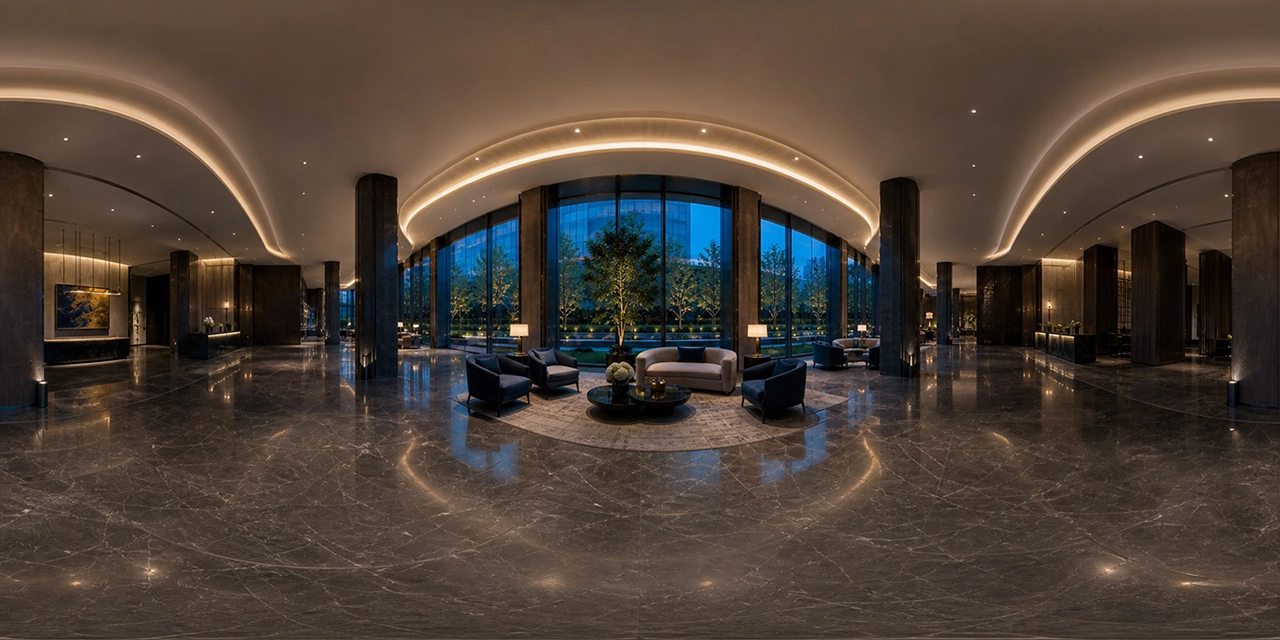

A360 Panorama Hero – Interactive 360° Panorama for WordPress
A360 Panorama Hero turns a static WordPress page header into an interactive 360° panorama. The panoramic image becomes the background of the Hero section, while the heading, description, buttons, and other elements are still created with standard Gutenberg blocks. This lets you build an impressive opening section without locking your content inside difficult-to-edit code.
This guide explains when a 360° panorama in a Hero section makes sense, how to prepare the right image, how to configure the A360 Panorama Hero block, and how to maintain readability, performance, and accessibility.
Table of contents
- What is A360 Panorama Hero?
- Who is this plugin for?
- Key features
- How to prepare a 360° panorama
- How to add an interactive Hero in WordPress
- How the block settings work
- Performance, UX, and accessibility
- Panorama Hero vs. a static image or video
- Frequently asked questions
What is A360 Panorama Hero?
A360 Panorama Hero is a free WordPress plugin that adds an interactive equirectangular panorama to the block editor as the background of a Hero section. Visitors can explore the surroundings by dragging with a mouse or finger, while the panorama can also rotate automatically.
The most important difference from many ready-made “360 sliders” is the way the foreground content is built. The plugin does not force you to use a separate page builder. Inside the Hero, you can use native WordPress blocks such as headings, paragraphs, buttons, groups, columns, icons, and images. Your content therefore remains editable, semantic, and visible to search engines.
The panorama creates the visual experience, while native WordPress blocks handle the message, navigation, and conversion.
The block can be used as a full-screen opening, a shorter category banner, or an interactive section inside a landing page. Its height can be adjusted for both compact headers and large Hero layouts.
Who is A360 Panorama Hero for?
An interactive Hero is especially useful when a place, interior, or surrounding area is part of the offer. Instead of describing a space only with words, you can let visitors see and explore it from the first second.
Hotels and apartments
Show the lobby, a room, restaurant, spa area, or terrace view before visitors even open the gallery.
Real estate
Create a strong first impression of an apartment, house, development, or commercial property.
Restaurants and events
Present the atmosphere of a dining room, garden, conference space, or event venue.
Museums and tourism
Encourage visits by showing an exhibition, monument, viewpoint, or landscape in 360°.
The plugin is also suitable for architects, 360° photographers, drone operators, car showrooms, sports venues, schools, clinics, and companies that want a more engaging landing page.
Key features of A360 Panorama Hero
- Interactive 360° background controlled with a mouse, touch, or keyboard.
- Native Gutenberg block that accepts standard WordPress blocks.
- Media Library integration without manually entering file paths.
- Optional poster image displayed while the interactive view loads.
- Adjustable Hero height from a compact banner to a large opening section.
- Background overlay for maintaining readable text contrast.
- Rotation speed and restart delay controls.
- Adjustable field of view for the initial panorama zoom.
- Three autoplay modes: always on, reduced-motion aware, or off.
- Horizontal and vertical content alignment.
- A single padding control for all four sides.
- Automatic compact layout for low-height Hero sections.
- Pause and resume button with an accessible label.
- Shortcode support for use outside the block editor.
How to prepare a 360° panorama
A good result starts with the right file. A360 Panorama Hero expects a 2:1 equirectangular panorama. The image width should be twice its height—for example, 4000 × 2000 px or 6000 × 3000 px.
Essential image preparation rules
- Use a complete 360 × 180-degree spherical panorama.
- Make sure the seam between the left and right edges is invisible.
- Level the horizon so the view is not tilted.
- Remove or blur faces, license plates, and protected information where necessary.
- Correct exposure, white balance, contrast, and saturation before export.
- Remove unwanted elements such as the tripod or an unattractive nadir.
- Export as JPEG or WebP, balancing detail with a reasonable file size.
WebP usually reduces panorama size while preserving good quality. Do not judge the file by size alone, however. Heavy compression can create visible banding and artifacts in skies, walls, and gradients while the panorama rotates.
The panorama and poster serve different purposes
The panorama is the source of the interactive view. The poster appears immediately and remains visible until the 360° engine is ready. You can use the same file, but a lighter image optimized for the first screen will often improve perceived loading speed and prevent an empty background.
How to add an interactive Hero in WordPress
- Edit a page or post in the WordPress dashboard.
- Open the block inserter and search for A360 Panorama Hero.
- Add the block where the interactive section should appear.
- Select a 2:1 panorama from the Media Library.
- Optionally select a lighter poster image.
- Add an H1 or H2 heading, description, and CTA buttons inside the block.
- Set the height, overlay, speed, field of view, and content alignment.
- Check the result on desktop, tablet, and mobile.
- Save a draft and test the page outside the editor.
Hero content should be short and specific: one clear heading, one or two explanatory sentences, and one primary button. A secondary button may lead to a gallery, complete virtual tour, price list, or contact form.
Example content structure
EXPLORE THE PROPERTY IN 360°
See the hotel before you book your stay
Look around the lobby, rooms, and restaurant. Explore the space and the view from the terrace.

See the hotel before you book your stay
Look around the lobby, rooms, and restaurant. Explore the space and the view from the terrace.
How do the block settings work?
| Setting | What it changes | Practical tip |
|---|---|---|
| Height | The height of the entire Hero section | For a homepage, start around 560–760 px; for a banner, try 320–500 px. |
| Overlay | The layer between the panorama and content | Match it to the image brightness and keep the text readable. |
| Rotation speed | The speed of automatic movement | Subtle motion usually works better than fast rotation. |
| Field of view | The initial panorama zoom | A lower value zooms in; a higher value shows a wider scene. |
| Resume delay | How long rotation waits after interaction | Give visitors enough time to inspect details comfortably. |
| Autoplay | Animation behavior after loading | The reduced-motion-aware option is a good accessibility choice. |
| Content alignment | Horizontal and vertical block position | Place text over a visually calm part of the panorama. |
| Content padding | Distance from all Hero edges | Check that text and buttons do not touch screen edges on mobile. |
Shortcode for other locations
If you cannot use the block, the plugin also provides a shortcode:
[a360_panorama image="panorama.jpg" poster="panorama.jpg" height="600"]You can provide a filename, a full Media Library URL, or an attachment ID. The speed, fov, resume, and autoplay parameters let you customize panorama behavior.
Performance, UX, and accessibility
A 360° panorama is a larger asset than a standard Hero image, so it should be used thoughtfully. The visual effect should not come at the expense of readability or page speed.
Lightweight by design
A360 Panorama Hero is a lightweight plugin. Its panorama styles and scripts load only on pages where the block or shortcode is actually used. It does not add an unnecessary site-wide script payload, does not track visitors, and does not require an external rendering platform.
- Do not upload a higher resolution than you really need.
- Use WebP or a well-compressed JPEG.
- Add a lightweight poster so visitors immediately see an attractive background.
- Do not place several heavy panoramas above the fold.
- Test on a real phone and a slower connection.
- Check Core Web Vitals and real loading times after deployment.
Content readability
A moving background can compete with the text. Use the overlay, limit paragraph width, and maintain strong contrast. The heading should not cover the panorama’s most important subject. If the center is visually busy, align the content to the left or right.
Automatic movement should remain calm. The plugin includes a pause button and a mode that respects the system’s reduced-motion preference—important for people who are sensitive to animation or use assistive technology.
SEO: a panorama does not replace content
Google will not understand an offer from an impressive background alone. Use a clear heading, service description, logical subheadings, internal links, and meaningful CTA buttons. Because the Hero content is built with native WordPress blocks, it remains part of the HTML document and can support the page structure.
Panorama Hero, static image, or background video?
| Solution | Greatest advantage | Limitation | Best use |
|---|---|---|---|
| 360° panorama | Visitors choose where to look | Larger file and more demanding rendering | Interiors, real estate, tourism, venues, and locations |
| Static image | The simplest and fastest option | Shows only one frame | Pages focused on speed and a simple message |
| Background video | Full control over presentation order | Visitors cannot control the view; video can be heavy | Brand stories, moving products, and planned narratives |
A Panorama Hero does not have to replace a gallery or a complete virtual tour. It works best as an engaging introduction: visitors get a taste of the space and then continue to the full presentation, booking system, offer, or contact page.
How to design a Hero that drives action
The panorama attracts attention, but the business goal is rarely limited to viewing an image. Define one main action: booking, sending an inquiry, opening the full tour, downloading an offer, or visiting a specific category.
The heading should answer “What will I gain?” instead of merely naming the property. “See the rooms and terrace view before you book” communicates more value than “A panorama of our hotel.”
- Hotel: CHECK AVAILABLE ROOMS
- Real estate: BOOK A VIEWING
- Restaurant: RESERVE A TABLE
- Museum: PLAN YOUR VISIT
- 360° photographer: REQUEST A QUOTE
Responsive design for different screens
The same block appears on a wide monitor, tablet, and narrow phone. Both the space available for text and the visible part of the panorama change, so a desktop preview is not enough.
Desktop
A wide screen reveals more of the surroundings and lets you place text on one side. Keep paragraphs reasonably narrow so they remain easy to read and leave room for exploration.
Tablet
Check portrait and landscape orientation. Buttons need a comfortable touch target, and the content must not be clipped when the device rotates.
Mobile
A large heading can fill most of the first screen. Shorten the message instead of shrinking it to an unreadable size. Buttons may stack vertically, and safe spacing from screen edges is essential.
Accessibility is part of the design
An interactive panorama should never be the only way to communicate important information. Visitors using a screen reader, avoiding gestures, or disabling animation must still understand the offer and reach the next step.
- Use a meaningful accessibility label for the 360° region.
- Do not place essential information only inside the image.
- Maintain sufficient contrast for text, buttons, and icons.
- Avoid aggressive or fast movement.
- Always let visitors pause the animation.
- Use a logical heading hierarchy and descriptive link text.
- Test keyboard controls and visible focus states.
When is a static image the better choice?
A 360° panorama is not necessary for every website. If the environment has little influence on the customer’s decision, a static image may communicate the message faster and with a smaller payload. It is also safer when the source material is weak, most visitors use very slow connections, or the primary goal is to display a simple form immediately.
Do not add a panorama only because it is technically possible. The strongest results come when free exploration answers a real customer question: What does the room look like? How is the venue arranged? What surrounds the property? What should I expect during my visit?
Common mistakes
- Using an ordinary photograph instead of a 2:1 equirectangular panorama.
- Setting automatic rotation too fast for comfortable reading.
- Omitting the poster and showing an empty background during loading.
- Using too little overlay behind white text.
- Adding too much text and too many buttons.
- Skipping tests on real mobile devices.
- Uploading an enormous, uncompressed image.
- Placing content over the panorama’s most important subject.
- Treating a panorama as a replacement for useful copy and SEO structure.
Build an interactive 360° Hero in WordPress—for free
A360 Panorama Hero combines an immersive background with the simplicity of Gutenberg. Add your own panorama, build the foreground with native blocks, and customize the layout without creating a separate coded template. The plugin is free to download and use.
Frequently asked questions
Is A360 Panorama Hero free?
Yes. A360 Panorama Hero is free to download and use. It does not require a subscription, an external panorama account, or paid rendering services.
What image do I need?
Use a complete 360 × 180-degree equirectangular image with a 2:1 aspect ratio—for example, 4000 × 2000 px. A standard photograph will not create a correct sphere.
Can I edit text and buttons in Gutenberg?
Yes. You can use native WordPress blocks inside A360 Panorama Hero, including headings, paragraphs, buttons, groups, and columns.
Does the panorama work on mobile?
Yes. The viewer is responsive and supports touch controls. Always test text size, padding, Hero height, and image weight on a real mobile device.
Can automatic rotation be disabled?
Yes. You can keep rotation always active, respect the visitor’s reduced-motion preference, or turn autoplay off.
Why should I add a poster image?
The poster appears before the interactive panorama is ready. It prevents an empty background, improves the first impression, and can reduce perceived loading time.
Does the plugin support a shortcode?
Yes. The shortcode displays a panorama where the A360 Panorama Hero block cannot be used directly.
Does A360 Panorama Hero create a complete virtual tour?
No. The plugin is designed primarily to present one panorama as an interactive Hero background. It can lead visitors to a complete tour, gallery, booking system, or offer page.
Is a 360° panorama good for SEO?
It can improve appeal and engagement, but it does not replace useful content. Clear headings, descriptive copy, logical structure, internal links, performance, and usability remain essential.